Why AI Data Capture Is Replacing OCR in Accounts Payable
AI  vs OCR Invoice Data Capture for Accounts Payable


For years, Optical Character Recognition—better known as OCR—was considered the best technology available for processing Accounts Payable invoices. It could read text off a scanned document, turn those characters into digital text, and give AP teams a starting point for data entry. In the era of paper invoices and filing cabinets, OCR felt like a breakthrough.


But that era is over.


Invoices today arrive from dozens of sources, in countless digital formats, with no consistency in structure or terminology. AP teams are expected to process them faster than ever, without errors, and with greater visibility into the numbers behind the spend. OCR, built for a very different world, simply cannot keep up.


That’s why AP automation platforms everywhere are abandoning OCR in favor of AI-driven data capture—a technology that doesn’t just read characters but actually understands invoices. And the difference is dramatic.


OCR Reads — AI Understands

The fundamental limitation of OCR is that it only performs one task: it converts shapes on a page into text. It does not know what those words mean. It can read the number “12,500,” but has no idea whether it’s a total, a unit price, or an invoice number. It can locate a line of text, but can’t tell whether it belongs in the header section or inside a table of line items.


AI data capture changes everything.


Modern AI models analyze invoices the way a trained AP specialist would. They identify the type of document, recognize which vendor it came from, locate critical fields like invoice numbers and due dates—even when vendors label them differently—and extract line-item tables with an understanding of their structure and relationships. Instead of guessing, AI interprets.


This shift from reading text to understanding documents is the reason AI consistently outperforms OCR, especially in environments with hundreds of vendors and thousands of invoice variations.

The Real World Is Messy — AI Handles It, OCR Doesn’t

One of the worst-kept secrets in AP is that OCR falls apart the moment invoice layouts change. Because OCR relies heavily on templates, zones, or pre-configured field positions, it can only perform well when a document looks almost exactly like the version it was trained on.


But invoices aren’t uniform.

They never have been.


Vendors constantly change formats, add or remove columns, reorganize line items, or send invoices in entirely new layouts. Some vendors generate invoices from accounting software; others send Word documents saved as PDFs; still others forward blurry scans from mobile phones or fax machines.


OCR treats these inconsistencies as problems.

AI treats them as input.


AI-based capture models are trained on massive volumes of varied invoice data and become increasingly accurate as they process more documents. They can read rotated invoices, low-resolution scans, distorted tables, and multi-page item lists. They don’t require templates or manual mapping because they are designed to recognize patterns and context—not fixed positions on a page.


The messier your invoice environment, the bigger the advantage of AI.


Try Our AI Invoice Data Capture

Line Items: The Breaking Point for OCR

If OCR struggles with header data, it completely collapses when confronted with line items.


Tables in invoices can be unpredictable. Some are simple; others contain multiple levels of detail, long item descriptions, merged cells, inconsistent spacing, or multiple columns with similar labels like price, unit cost, extended amount, or amount due.


OCR sees a grid of text and extracts characters.

AI sees structure.


AI can interpret tables, understand repeating patterns, break apart multiline descriptions, and differentiate quantities from prices—essential for accurate PO matching and coding. This is where OCR-based workflows force AP teams back into manual entry, despite the “automated” promise. It’s also where AI saves the most time.


From Extraction to Straight-Through Processing

Perhaps the most overlooked distinction is that OCR stops at extraction. Once OCR produces raw text, AP teams must:


  • validate fields
  • correct errors
  • match values
  • look for duplicates
  • check PO details
  • apply coding rules


In other words: OCR creates work for AP.


AI, by contrast, is part of a complete automation pipeline. It doesn’t just extract—it validates, classifies, checks for compliance, understands exceptions, and improves over time. It performs many of the decisions previously handled by people, enabling straight-through processing for high-quality invoices and greatly reducing exception queues for everything else.


OCR transfers labor from paper to keyboard.

AI removes the labor entirely.


The Economic Impact: Lower Cost, Fewer Errors

Companies switching from OCR to AI typically see:


  • fewer exceptions
  • faster invoice cycles
  • dramatically reduced data entry labor
  • better PO match rates
  • fewer duplicate or fraudulent invoices
  • increased vendor satisfaction
  • more accurate accruals and spend reporting


None of these gains come from “reading text more accurately.”

They come from understanding the invoice.


That’s something OCR was never designed to do.


The Future of AP Will Be Built on AI, Not OCR

OCR is a legacy technology from a paper-first era. It remains useful for basic scanning, but it is no longer adequate for organizations that need speed, accuracy, or financial control.


AI data capture is now the backbone of modern AP automation.

It’s flexible, self-learning, and capable of interpreting documents with human-level context. It is the difference between digitizing your AP workflow and actually automating it.


AP teams that adopt AI move faster, reduce costs, and operate with the confidence that their invoice data is complete, correct, and flowing into downstream processes without friction.


Those that stay on OCR will continue fighting exceptions, patching templates, and manually correcting mistakes every month.


In today’s AP environment, the question isn’t whether AI is better than OCR—it’s whether organizations can afford to keep using OCR at all.


Ready to Learn More About AI Data Capture. Contact Us.

By Richard Pigott November 12, 2025
Executive Summary: Why ERP-Native AP Automation Fails — and Why Vision360 Enterprise Wins ERP “AP Automation” promises simplicity but delivers shallow workflow. Vision360 Enterprise was built from the ground up to automate the entire invoice lifecycle — from intelligent capture to payment — delivering true AI-powered efficiency, faster ROI, and freedom from ERP lock-in. 1. ERP Vendors Build Breadth, Not Depth ERP systems manage everything — but master nothing. Vision360 Enterprise focuses solely on AP automation , achieving: 2–3× higher straight-through processing Faster adoption and measurable time-to-value Continuous AI learning and enhancement 2. ERP “Automation” = Manual Workflows in Disguise ERP modules digitize invoices but still depend on manual validation, GL coding, and exception routing. Vision360 Enterprise applies automated business rules and logic to achieve near-touchless processing. 3. ERP Customization = Permanent Technical Debt ERP automation success requires heavy scripting and consulting — each upgrade breaks it again. Vision360 Enterprise integrates natively, updates seamlessly, and eliminates technical debt. 4. ERP Lock-In Limits Agility ERP automation binds you to one vendor and one process. Vision360 Enterprise connects across multiple ERPs, entities, and regions — providing agility through change. 5. Vision360 Enterprise Delivers Measurable ROI 70–80% fewer manual AP touches 50–60% faster invoice cycle times 2× early-payment discount capture Payback in under 12 months Conclusion: ERP vendors digitize invoices. Vision360 Enterprise automates intelligence. For finance leaders serious about eliminating manual work, improving visibility, and future-proofing their payables process — Vision360 Enterprise is the clear strategic choice.
By Richard Pigott October 31, 2025
Every month-end, accounting teams face the same challenge: closing the books quickly, accurately, and in compliance with reporting standards. But one recurring issue often slows things down — missing accruals. If you’ve ever been asked by accounting to “send your accruals,” it’s not just a formality. Your accruals are essential to producing an accurate picture of the company’s financial health. What Are Accruals? Accruals represent expenses that have been incurred but not yet invoiced or paid. They align costs to the correct accounting period — ensuring financial results accurately reflect when the work was done or the goods were received. Without accruals, one month’s profit may look inflated while the next month is overstated — skewing performance metrics, budgets, and forecasts. Why Accounting Needs Your Accruals 1. To Ensure Accurate Financial Reporting Accruals help accounting record expenses in the period they were incurred, not when invoices arrive. This ensures management and stakeholders see the company’s true financial position. 2. To Avoid Budget and Forecast Distortions When expenses are recognized late, they show up in the wrong month — confusing budget owners and making forecasts unreliable. Timely accruals keep budgets aligned and predictable. 3. To Accelerate the Month-End Close Every missing accrual adds hours or even days to the close process. Submitting accruals promptly helps accounting close faster, deliver timely reports, and support better business decisions. 4. To Maintain Compliance and Audit Readiness Auditors look for complete and consistent expense recognition. Well-documented accruals show adherence to GAAP or IFRS standards and demonstrate strong financial controls. 5. To Strengthen Collaboration Between Finance and Operations Submitting accurate accruals isn’t just helping accounting — it’s helping your entire business operate with transparency and precision. Best Practices for Submitting Accruals Track pending costs: Keep notes on goods or services received but not yet invoiced. Communicate early: Let accounting know about large or recurring expenses before month-end. Meet deadlines: Submit accrual details on time to support a smooth close process. Vision360 Enterprise: Using an AP Automation system like Vision360 Enterprise allows centralized processing of supplier invoices which allows accounts payable visibility and control with the ability to generate accruals instantaneously. The Bottom Line Accruals are more than a technical accounting task — they’re the foundation of financial accuracy. When every department participates in the accrual process, the result is faster closes, cleaner reports, and better business decisions. So next time accounting asks for your accruals, remember: they’re not chasing paperwork — they’re protecting accuracy, compliance, and the integrity of the numbers.
By Richard Pigott October 28, 2025
Be honest: Does your Accounts Payable process still rely on paper, email approvals, and manual data entry? If so, your AP process might be stuck in 1999 — while the rest of finance has moved decades ahead. In today’s fast-paced, AI-driven finance world, AP automation isn’t optional anymore — it’s essential. Here are five signs your Accounts Payable process needs automation, and how modern finance teams are transforming their workflows with AI-powered invoice processing and automated approval systems. 1. You’re Still Digging Through Emails or Paper Invoices If your team still receives invoices as PDFs, attachments, or even paper copies, you’re stuck in a pre-cloud era. Back in 1999, mail and fax were standard. But in 2025, manual invoice handling wastes time, increases data entry errors, and limits visibility. Modern AP automation systems use intelligent data capture, AI and OCR technology to automatically extract and validate invoice data — no typing, no spreadsheets, no missing files. Why it matters: Eliminates manual entry and human error Prevents lost or duplicate invoices Speeds up processing and approvals Modern alternative: A cloud-based invoice capture service that imports invoices automatically and syncs them directly with your ERP or accounting platform. 2. Approvals Still Depend on Email Threads or Paper Signatures If managers still approve invoices by replying to emails or signing paper copies, your invoice approval workflow hasn’t changed in 25 years. Today’s AP automation platforms use automated approval workflows that route invoices instantly based on predefined rules — by department, spend threshold, or GL code. Every action is tracked, timestamped, and auditable. Benefits of automation: Instant routing and escalation Full visibility for AP and management Clear audit trail and compliance record Modern alternative: Rules-based approval automation that eliminates delays, reduces bottlenecks, and ensures on-time payments. 3. You Have Little or No Real-Time Visibility Into Payables In 1999, waiting for end-of-month reports was normal. But in 2025, real-time visibility into payables is mission-critical for cash flow and forecasting. If you’re still updating spreadsheets or manually reconciling data, you’re missing the insights needed to manage spend effectively. Modern Accounts Payable automation dashboards show invoice statuses, exception alerts, and payment readiness in real time — no waiting, no guesswork. Why visibility matters: Prevents late payments and cash surprises Supports better decision-making Strengthens supplier relationships Modern alternative: A real-time AP analytics dashboard that delivers instant insight into outstanding invoices, payments, and workflow performance. 4. You’re Still Cutting Paper Checks or Logging Into Multiple Portals If your AP team still prints checks or logs into multiple banking portals to make payments, you’re wasting hours on tasks that modern payment automation systems can do in seconds. In 1999, that was standard. Today, automated payment processing securely matches invoices to purchase orders, schedules payments, and reconciles accounts automatically. Why automate payments? Reduces fees, errors, and fraud Improves supplier satisfaction Speeds up month-end close Modern alternative: End-to-end payment automation that manages ACH, virtual cards, and digital payments directly from your AP automation platform. 5. Your AP Team Is Overworked and Undervalued If your Accounts Payable team spends most of their time keying data, chasing approvals, and answering vendor questions, they’re working harder — not smarter. AI in Accounts Payable eliminates repetitive work, empowers staff, and shifts focus toward higher-value activities like supplier analysis and cash management. Benefits of AI-powered AP workflows: 70–80% fewer manual tasks Lower risk of data errors Happier, more productive teams Modern alternative: AI-driven AP automation software with intelligent routing, exception handling, and self-service supplier portals. The Bottom Line: 1999 Processes Can’t Compete in 2025 and Beyond. Finance has evolved. Paper-based, manual Accounts Payable processes haven’t. Modern AP automation solutions deliver speed, accuracy, and real-time visibility across the entire invoice-to-pay cycle. By embracing AI and automated workflows, you build a finance operation that’s smarter, faster, and future-proof. If your current AP workflow shows even one of these five signs, it’s time to automate — because 2025-ready finance teams don’t just process invoices, they analyze, optimize, and innovate. Next Steps: Modernize Your Accounts Payable with AI Audit your current AP workflow — find bottlenecks, delays, and data entry points. Calculate your manual processing cost — time, errors, and lost discounts add up. Explore AI-powered AP automation software that integrates with your ERP and provides full visibility. Don’t let your Accounts Payable team operate like it’s still 1999. Modernize with AI-driven AP automation to reduce costs, accelerate approvals, and empower your finance team. If you’re ready to see how AI-powered AP Automation can transform your finance operations, book a demo or schedule a workflow assessment . We’ll show you how to eliminate manual processes, reduce costs, and bring your Accounts Payable process into the modern era.
AP Automation in Healthcare
By Richard Pigott September 22, 2025
Discover how AP automation helps healthcare cut costs, improve compliance, prevent fraud, and free staff to focus on patient care.
By Richard Pigott September 5, 2025
Accounts Payable Workflow vs. AP Automation: What’s the Difference?
Coupa Invoice Data Entry
By Richard Pigott August 29, 2025
Enhance Your Coupa Investment by Eliminating Manual Invoice Entry
By Richard Pigott June 19, 2025
Creative, Manual-Free Strategies In today’s hyper-efficient business landscape, automation often steals the spotlight when it comes to streamlining Accounts Payable (AP). But what if you're not ready for automation—or prefer to avoid the cost, complexity, or integration headaches that come with implementing an AP workflow system? There are still plenty of non-automated ways to dramatically improve AP efficiency. Many of these methods are process-based, culture-driven, or leverage existing tools in creative ways. Below, we explore smart, often-overlooked strategies that reduce manual work without a single line of code or automation software. 1. Centralize and Standardize All AP Policies and Procedures Why it matters: Inconsistent invoice handling is a key source of manual work. What to do: Create a comprehensive AP manual with step-by-step instructions for handling invoices, approvals, disputes, vendor queries, and accruals. Ensure all stakeholders (AP clerks, department heads, vendors) are trained on these standards. Mandate standard formats for POs and invoices, with clearly defined required fields. ✅ Pro Tip: Use visual SOPs (standard operating procedures) and flowcharts to make procedures easier to follow—no software needed. 2. Shift the Burden to Vendors — Implement a “Vendor Self-Service” Mindset Why it matters: Many AP inefficiencies stem from missing or incorrect vendor data. What to do: Require vendors to submit invoices in a standardized format (e.g., PDF with PO in subject line). Mandate that vendors populate a standardized invoice cover sheet, downloadable from your website or included in onboarding kits. Set up a dedicated email address and strict submission guidelines to reduce email-based clutter. ✅ Out-of-the-box idea: Create a “Vendor Onboarding Kit” with instructions, sample invoice formats, W-9 forms, and FAQ. This shifts data entry and compliance upstream. 3. Eliminate Paper at the Source (Without Automation) Why it matters: Paper introduces delays, errors, and storage headaches. What to do: Close physical mailboxes for AP. Ask vendors to stop mailing invoices altogether. Use scanners and shared drives (like Google Drive or SharePoint) to store invoices. Ask internal stakeholders to submit invoice images from mobile phones when traveling or in the field. ✅ Out-of-the-box idea: Empower the front desk or mailroom to reject paper invoices on arrival and direct vendors to the proper digital channels. 4. Create a “PO-First” Culture Why it matters: Non-PO invoices require more review and often bypass pre-approval processes. What to do: Make POs mandatory for all purchases over a low threshold (e.g., $200). Publish a company-wide “No PO, No Pay” policy—and enforce it rigorously. Educate department heads and project managers on how and when to request POs. ✅ Bonus: Use Excel-based PO logs with pre-defined templates. No fancy software needed—just consistency. 5. Adopt Calendar-Driven Invoice Processing Cycles Why it matters: Processing invoices on a rolling basis leads to chaos. What to do: Establish weekly invoice intake days (e.g., Tuesday/Thursday only). Allocate specific days of the month for approvals, accruals, and vendor payments. Let vendors know your “invoice cut-off days” and stick to them. ✅ Out-of-the-box idea: Set up a shared team calendar (Google, Outlook) to visually track invoice cycles and deadlines. 6. Assign “Invoice Champions” by Department Why it matters: Chasing down approvals and missing GL codes is a huge time sink. What to do: Designate an Invoice Champion in every department who owns responsibility for coding and approving invoices. Provide them with GL code cheat sheets, training, and expectations around turnaround time. Use internal SLA (service level agreement) metrics to encourage fast action. ✅ Clever twist: Reward champions with shout-outs or small bonuses for timely approvals and clean submissions. 7. Use Color-Coded Physical Tools for In-Office AP Why it matters: Visual systems reduce the need for constant verbal clarification. What to do: Use colored folders, stamps, or bins to indicate invoice status: needs approval, ready to pay, disputed, etc. Place folders in designated locations by department or approver. Rotate colors monthly to track invoice age. ✅ Old-school, but effective: Implement a “red folder” system to immediately flag urgent invoices or disputes. 8. Build Smart Templates in Excel or Google Sheets Why it matters: Manual entry errors eat time and cause payment delays. What to do: Create pre-formatted invoice registers with dropdowns for GL codes, departments, and vendors. Use data validation and conditional formatting to highlight missing fields or errors. Maintain a vendor master file with up-to-date banking and contact info. ✅ Out-of-the-box idea: Use Google Forms to collect invoice data and auto-fill a spreadsheet for processing. 9. Host Monthly “Invoice Review Huddles” Why it matters: One-time fixes don’t solve systemic inefficiencies. What to do: Hold short monthly meetings with AP, procurement, and department heads to review: Top 10 slowest invoices Recurring vendor issues Approval bottlenecks Use these to adjust policies, retrain teams, or escalate chronic issues. ✅ Culture shift: Treat AP like a business partner, not a back-office task. 10. Tame Email Chaos with Smart Labeling and Filters Why it matters: Invoices get lost in crowded inboxes. What to do: Create inbox rules to label, sort, and auto-archive AP emails. Designate an AP triage person who checks email twice daily and logs incoming invoices to a master sheet. Avoid forwarding—stick to centralized viewing folders. ✅ Bonus: Use naming conventions like “INV_[Vendor]_[Date]” to make searching painless. Final Thoughts Automation isn’t the only path to AP efficiency. With a strategic mindset and creative thinking, AP departments can eliminate manual tasks, improve accuracy, and even elevate their internal reputation—all without investing in software. The real key is structure, discipline, and shifting effort to where it adds the most value: early in the process, not at the point of payment.
Accounts Payable Fraud Prevention Vision360
By Richard Pigott June 19, 2025
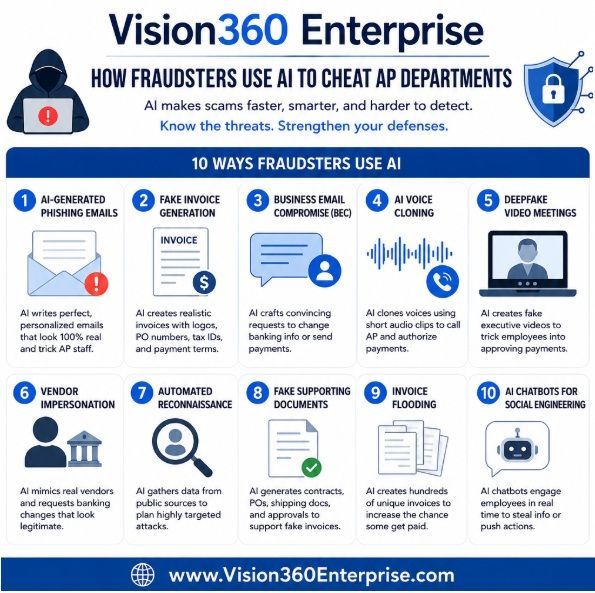
In today's fast-paced, digitized business environment, few departments are as vulnerable to cyber threats as Accounts Payable (AP). Ironically, the very processes designed to keep a business running—paying vendors, processing invoices, handling reimbursements—also serve as the perfect entry points for cybercriminals. The heavy reliance on human intervention, outdated email workflows, and weak verification protocols create a fertile ground for phishing, invoice fraud, and ransomware attacks. Why AP is a Prime Target Accounts Payable teams typically deal with hundreds, sometimes thousands, of emails per month. These emails often contain attachments—usually PDF invoices—or hyperlinks to download documents or confirm banking details. This routine, repetitive engagement with external content makes AP staff prime targets for social engineering. Consider the daily tasks of a typical AP clerk: Opening emails from vendors. Downloading or previewing attached invoices (often in PDF format). Clicking on links to verify details or approve transactions. Processing changes to vendor banking details with minimal validation. All these actions can be weaponized by attackers. A single click on a malicious link or opening a booby-trapped invoice attachment is all it takes to compromise an entire network. Real-World Consequences of AP Cyberattacks Unfortunately, this isn't just a theoretical risk. Some high-profile examples underscore the staggering financial and reputational cost of cybercrime targeting AP functions: Scoular Company (2014): This commodities trader lost $17.2 million when a finance employee was tricked by a Business Email Compromise (BEC) scam, believing they were transferring funds to a legitimate Chinese bank for a corporate acquisition. Ubiquiti Networks (2015): The company fell victim to an AP-related phishing attack and wired over $46.7 million to fraudsters posing as legitimate vendors. Toyota Boshoku (2019): A subsidiary of Toyota lost $37 million due to an AP-related email scam where attackers posed as business partners requesting a change in bank account information. The City of Baltimore (2025): A cybercriminal used accounts payable to gain access to more than $1.5 million in payments intended for a city vendor. In addition to direct financial losses, organizations also face: Costly forensic investigations to trace breaches. Downtime and disruption to business operations. Reputational damage, particularly if vendor or employee data is leaked. Compliance violations, especially with data privacy regulations such as GDPR or HIPAA. Human Error: The Unreliable Guard At the core of many AP-related breaches is human error. Even the most well-trained employees can be deceived by increasingly sophisticated phishing attempts. And traditional "awareness training" is no match for cleverly designed attacks that mimic internal communication styles or spoof known vendors. This is where automation becomes not just beneficial, but essential. Securing AP with Vision360 Enterprise Accounts Payable Automation Vision360 Enterprise offers a powerful solution to mitigate cyber threats in the Accounts Payable process. By removing the dependency on manual processing and email-driven workflows, Vision360 helps close the doors that cybercriminals frequently exploit. Here’s how Vision360 enhances AP security: Automated Invoice Capture and Vendor Validation Invoices are ingested directly into the system through secure channels, bypassing the need for staff to open email attachments or click unknown links. Role-Based Access and Approval Routing Payments and approvals follow a structured, rule-based workflow. This eliminates unauthorized changes or approvals and reduces the risk of impersonation. Audit Trails and Visibility Every step in the process is logged and tracked, creating a full audit trail. This not only strengthens internal controls but also simplifies investigations in the event of suspicious activity. Integration with ERP and Vendor Master Data Vision360 synchronizes with existing systems, ensuring all data is up-to-date and minimizing opportunities for fraudulent entries. Conclusion The Accounts Payable department is no longer just a financial function—it’s a cybersecurity risk vector. With phishing and invoice fraud on the rise, businesses can no longer afford to rely on manual processes and email-based workflows that leave them exposed. Vision360 Enterprise offers a future-proof way to secure AP operations. By enforcing automated controls and minimizing human intervention in critical points of vulnerability, it not only streamlines invoice processing but also fortifies your organization against fraud and cybercrime. Now more than ever, securing your AP process isn’t optional—it’s essential.
18 Ways to Streamline Accounts Payable WITHOUT AP Automation
By Richard Pigott November 21, 2024
18 Ways to Streamline Accounts Payable WITHOUT AP Automation